
Business Process Automation 101: A Small Business Owner’s Guide to Mastering AI Integration Services
Your team is drowning in repetitive tasks. Invoices need sending. Follow-up emails pile up. Data entry eats hours every week. Meanwhile, your competitors are scaling faster with fewer people.
Business Process Automation (BPA) levels that playing field. It's not about replacing your team: it's about multiplying their output. The right automation strategy transforms how small businesses compete, giving you enterprise-level efficiency without the enterprise budget.
What Business Process Automation Actually Means
Strip away the jargon. BPA is technology doing the grunt work your team shouldn't be doing manually.
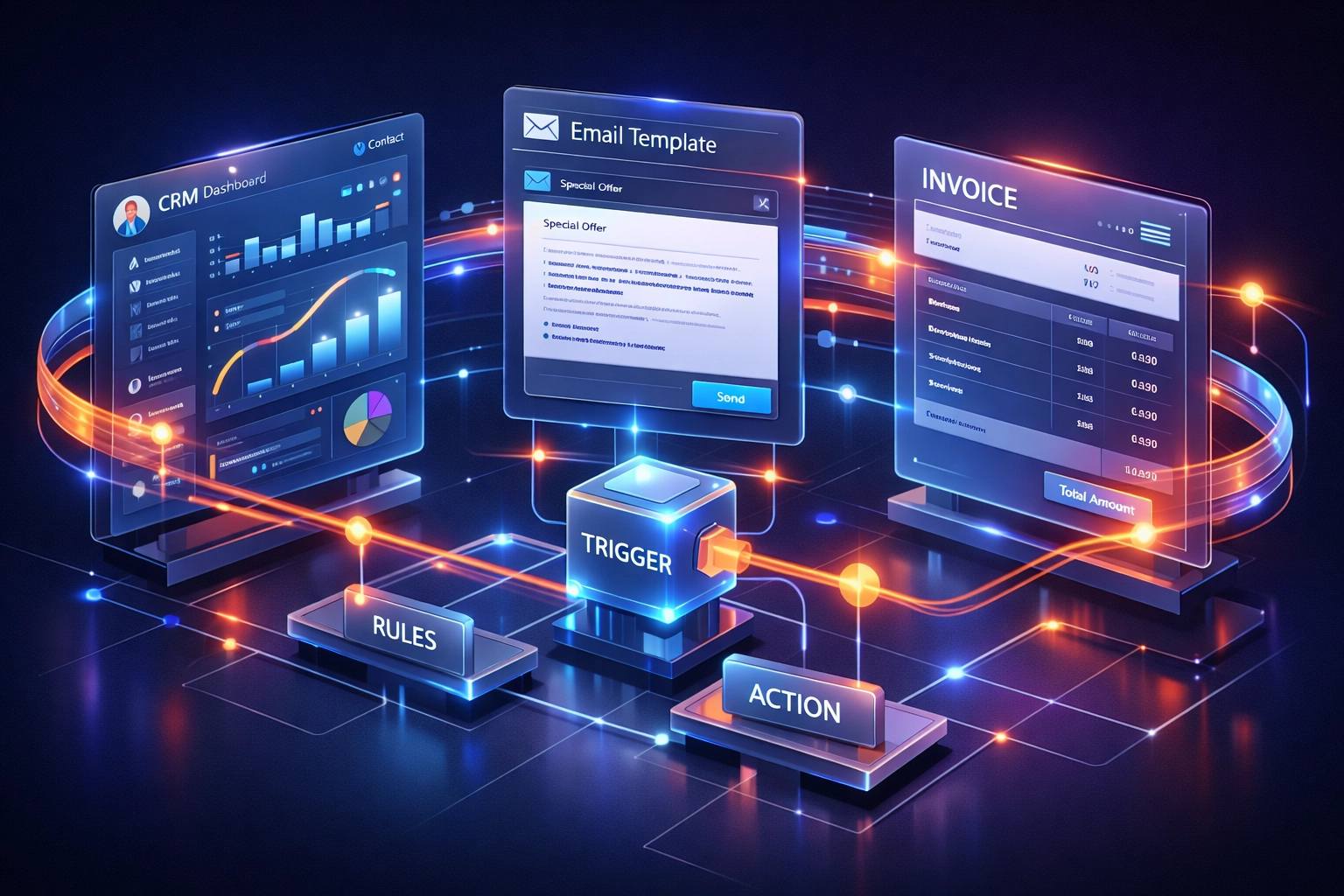
Think of it as building a digital assembly line. When something happens: a form gets submitted, an invoice is paid, a customer asks a question: automation kicks in. The system executes the next steps automatically. No human babysitting required.
The components are straightforward:
- Triggers that start the process (new lead enters CRM)
- Rules that define what happens next (if purchase over $500, flag for review)
- Actions that execute automatically (send welcome email, update spreadsheet, create task)
- Integrations that connect your tools into one workflow
This isn't futuristic. It's operational reality for businesses that refuse to waste hours on tasks a computer can handle in seconds.
Why Small Businesses Can't Ignore Automation Anymore
February 2026. AI automation has gone from competitive advantage to table stakes.
Your competitors are using it. Your customers expect the speed it delivers. Your team wants to work on meaningful projects, not copy-paste data between systems.
The math is brutal. Five hours per week on manual data entry? That's 260 hours per year. Per person. At $30/hour, you're burning $7,800 annually on work that automation handles for pennies.
But it's bigger than cost savings. Automation creates consistency. Humans forget steps. Get tired. Make mistakes. Automated workflows execute perfectly every time. Your customer experience improves. Error rates drop. Your team focuses on growth, not maintenance.
The Implementation Roadmap: From Chaos to Control
Step 1: Identify What's Killing Your Time
Look at your team's calendar. Which tasks repeat weekly? Daily? What processes require the same steps every single time?
Common automation gold mines:
- Invoice generation and payment tracking
- Email follow-up sequences for leads
- Customer support ticket routing
- Social media content scheduling
- Data synchronization between platforms
- Report generation and distribution
Don't automate everything at once. Find the process causing the most pain and start there.
Step 2: Map It Out
Before you automate, understand the workflow completely. Document every step from start to finish.
Use a simple format:
- What triggers the process?
- What information is needed?
- What decisions get made?
- What's the desired outcome?
- Which tools are involved?
This clarity prevents automating broken processes. Fix the workflow logic first, then automate it.

Step 3: Choose Your Tools Strategically
The automation platform landscape splits into two camps: simple connectors versus full workflow engines.
Zapier made automation accessible. Connect App A to App B. When this happens, do that. Perfect for straightforward, linear workflows. The limitation? Complex conditional logic gets messy fast.
n8n takes a different approach. Self-hostable. More control. Advanced branching logic. For businesses serious about automation as infrastructure, the n8n vs Zapier decision often comes down to scalability needs and data privacy requirements.
For data-centric workflows, Airtable automation deserves attention. It's not just a fancy spreadsheet: it's a database with built-in automation capabilities. Create records, send notifications, update fields based on conditions. When your business logic lives in structured data, Airtable becomes your automation command center.
The right choice depends on your specific needs. We help clients navigate this decision daily at Yotomations, matching automation architecture to business goals.
AI Integration: The Force Multiplier
Standard automation follows rules. AI automation understands context.
Modern AI chatbots don't just answer FAQs: they triage customer issues, route complex questions to the right team member, and learn from every interaction. They handle the 80% of inquiries that follow patterns, freeing your team for the 20% requiring human judgment.
AI-powered features transforming small business automation:
Document intelligence that reads invoices, receipts, and contracts: extracting data automatically instead of manual entry.
Natural language workflow builders where you describe what you want in plain English, and the system generates the automation.
Predictive task management that suggests next steps based on historical patterns and current context.
Smart scheduling that finds meeting times, considers preferences, and handles the back-and-forth automatically.
The key? These AI capabilities plug into existing automation workflows. You're not rebuilding from scratch: you're enhancing what you've already built.

Common Pitfalls (And How to Dodge Them)
Automating broken processes. If a workflow is inefficient manually, automation just makes it fail faster. Fix the process first.
Over-complicating early implementations. Start simple. Prove value. Build complexity gradually as you understand the system better.
Neglecting error handling. What happens when an API fails? A field is empty? A service goes down? Build fallbacks and notifications into every workflow.
Forgetting to involve the team. Automation affects how people work. Get input early. Train thoroughly. Address concerns directly.
Set-it-and-forget-it mentality. Markets change. Tools evolve. Your business grows. Review automated workflows quarterly to ensure they still serve your needs.
Integration: Making Your Tools Talk
Your business runs on multiple platforms. CRM. Accounting software. Email marketing. Project management. E-commerce platform.
Disconnected tools create data silos and duplicate work. Integration is where automation delivers maximum leverage.
Modern integration doesn't require custom coding. APIs and middleware platforms connect disparate systems without developer overhead. When a sale closes in your CRM, your accounting system updates automatically. When a project milestone completes, client notifications send and invoices generate.
This connected ecosystem eliminates the constant context-switching and manual synchronization that drains productivity.
The Yotomations Approach
We've implemented automation for small businesses across industries. The pattern is consistent: businesses that treat automation as infrastructure: not a one-time project: see compounding returns.
Our methodology focuses on:
- Quick wins first. Demonstrate value within weeks, not months.
- Scalable architecture. Build foundations that grow with your business.
- Team enablement. Transfer knowledge so you own the system.
- Continuous optimization. Automation isn't done: it evolves.
The businesses thriving in 2026 aren't just using automation. They're building autonomous operations that scale without proportional headcount increases.
Your Next Move
Business process automation isn't optional anymore. It's the difference between grinding harder and scaling smarter.
Start with one process. Map it. Automate it. Measure results. Then repeat.
Or partner with experts who've built these systems hundreds of times. We know the shortcuts, the pitfalls, and the strategies that deliver ROI fastest.
Ready to stop drowning in manual work? Let's talk. Your competitors already are.
